Why Duck Game PS4 is taking Forever

vincent2

I haven’t really said anything in a week or two. I’ve been staying off/accidentally forgetting all about Twitter to avoid distractions as I’ve been working trying to get the PS4 version of Duck Game working correctly. A massive update is planned for the Steam version of Duck Game, and the plan is to release it at the same time as the PS4 (XBONE too I guess) version. There was a semi-open beta for the update content a few weeks ago, which was supposed to last only a week but I ended up leaving it open due to the code base and my attention basically being in limbo.

This post will hopefully clear up some questions about that, and help explain why this Duck Game update/port has been taking so long.

The PS4 and PC versions of Duck Game are pretty closely tied together. I originally wrote the update content for the Steam XNA version of the game, and had the porting company convert the changes over to the Unity based PS4 and XBONE versions of the game. The plan was to fix a bunch of stuff that bothered me in the original release (random levels, mostly, they are completely rewritten and much better and look like pyramids now), while also adding a new online leveling and room customization system that I wanted to have in the first place.  The update content was basically all implemented in June of last year, with the plan being for the PS4 version and update content to come out in August. That never ended up happening due to serious online performance related delays with the port, and I instead ported over a few smaller changes into a Halloween themed patch last October. So the plan was for the big update and console port to come out in November instead. Then February, then April, etc. etc.

It wasn’t until January of this year that I started helping the porting company directly, with hopes of getting the problems sorted out quickly so we could get this update out. I flew out to London for a week to work with the porting team directly, then flew to Atlanta for another week to work with Adult Swim directly, then finally they sent me some PS4 dev consoles and I’ve been working on the port from home since the end of February. Nobody expected it to take this long, and I never would have guessed how much work still needed to be done to do to get everything working. I’m still working on the port right now.

So what exactly happened that could cause the port to take so long, and how could the port keep the update from coming out? Adult Swim wanted me to time the release of the console version with the release of the big update, the idea was that it would be cool for everyone on every platform to be excited for the new content all at once. As the port got pushed further and further, keeping that promise got more and more awkward as people kept asking what was up. I was under the assumption that the port would be finished soon, so every month I’d say “It’s coming soon, should only be a few months till the update!”. I really believed it.

sdfdf2

The game was running at 60FPS with regular massive lag spikes with 2 players in an online match. With 4, though, the game was running at around 15FPS, with constant packet loss and network dropouts, along with an endless list of strange synchronization bugs that didn’t make sense. Then in January, when Adult Swim got me involved in the porting process, I realized what the problem was.  The netcode for Duck Game is bad, and it was way CPU intensive and took way too much network bandwidth to possibly work on console.

 “The netcode for Duck Game is bad”

Duck Game’s netcode originally took me about a year to write, and when I talk to people about it I get emotional and vent about how it was a terrible year and I’d never want to do it again. I’d never coded a real time network game before and the weird combinations of shit that can happen in Duck Game posed a serious challenge when it came to coming up with a system that would work for everything. The netcode is a total mess, that I was able to get everything working in the first place is nothing short of a miracle. At the beginning of January I realized that I had to re-write most of that awful net stuff that took so many endless nights of debugging and uncertainty. I had to re-write it and I had to know exactly what I was doing and why, because the PS4 couldn’t take running a bunch of unnecessary code and sending a bunch of redundant data.

So I’ve been re-living that whole process, building the online code from the ground up all over again. It’s kept the Steam update in an awkward state, too, since the Steam version needs to share a lot of code with the PS4 version. After I opened up the PC beta, I tore down a bunch of systems and got to work putting them back together. The beta was going to last a week, and I had a number of patches ready but then things got out of hand and I decided I couldn’t release any of the new net code yet with any amount of confidence. So the Beta is left open with a strange buggy half ported build that’s likely to stay the way it is a bit longer yet.

It’s only now, coming up on June, that an end is in sight. The PS4 version is running at 60FPS with minimal packet loss. I just finished re-writing the object interpolation and state synchronization code, since it’s a complete re-write there are a number of new gameplay bugs caused by it. Overall though the net synchronization is much more accurate and efficient, and as soon as the bugs are moved outside then the PS4 version is essentially ready minus some certification stuff that I’m told the porting company will deal with. Along with it comes the update for the Steam version. As soon as the PS4 codebase is back in the porting company’s hands, there’s still some new stuff I wanna get in there in the month or so I’ll have before release.
dartchaingun

So the quick version is that the major code changes required to make the PS4 version functional are finished, and release is only now on the horizon of the near future with any level of confidence. I’d love to see it come out by the end of June, I’ll definitely have the PC Beta updated with the new online code before then.

I’m sorry to everyone who’s been waiting longer and longer and longer, and I’m extra especially sorry to anyone who’s tried to talk with me in the last couple of months. My mind has been either 100% in this port, or freaking out about how I broke the net code again and it’s “definitely broken forever this time”. It’s not broken anymore, but it’s gonna be a few months before me and Duck Game are back to normal.

Thanks for sticking around.
Posted in Uncategorized | 22 Comments

Thoughts on Game Secrets

PacManScreenshotWidth513

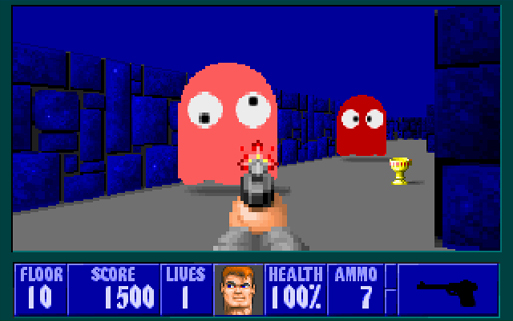
In old Mario games there are hidden boxes that give you bonuses. If you’re jumping and you hit one, it will appear out of thin air. So you think, “Woah! I found a secret, cool!”. Wolfenstein had this sort of secret as walls that turn out to be secret doors. These are the types of game that made me love secrets, it can be really exciting to find something you’ve never seen before. It’s also fun to be “in the know” about the secret stuff in your favorite game, you can tell newbies about that machine gun on the first level, or that whistle that lets you skip all those levels.

Totally hidden stuff seems like a cool idea, but the inclusion of anything in a game, even a cool secret, can potentially cause problems. The problem with totally hidden stuff, for example: Hidden walls/boxes force you to check everywhere if you want to find everything. Regardless of whether it’s an optional secret or not, when you find a secret door that looks like every other wall, you will feel the temptation to look for more. This means pushing up against every wall, jumping on every tile, pressing down on every green pipe. That’s not really very fun. Those platformer levels that have something special hidden if you start out going left instead of right fall into this category as well. It forces me to try going left every single time.


Secrets Can Hurt Or Help

So how do you do secrets then? I think a secret should be something that’s easy to miss, but not impossible to detect. For example if you want a push wall secret, make the wall look slightly different. Or maybe there’s a computer beeping in the room behind the wall, and you can track down the location of a secret door based on sound. Doom had a couple places where you could hear a secret door open somewhere out of view when you press something or step on a certain tile, this is a cool way to make a detectable secret. If you do secrets in a way that the player can master, they become less about repetition and googling, and more about exploration.

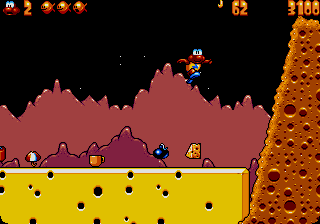
Another good kind of secret is the kind where the reward is visible to the player but out of reach. Earthworm Jim has lots of spots like this, a life or a gun somewhere you can’t get to. These secrets require you to use the game mechanics in a clever way, or explore the level better to figure out a path to reach the item. They can even just be a reward for doing something tricky, like swinging through a maze of spikes. In this case the path is no secret, it’s in plain sight, but it’s obviously not an easy path. The player will see a life in a risky area and think, “Am I good enough to get that life without losing one, or should I play it safe?”. There’s a real sense of reward when you take that risk and pull it off.

ewj

One more detail is that you might not want to let players “farm” your secrets. If you can farm something, that means you can do some repetitive action to get as many of it as you want. For example, imagine you have 3 secrets in your level that each give the player a life. If you respawn those lives after every death, then the player has the option to die on purpose and run through the level again. They lose 1 life, but they gain 3 lives from your secrets. Same goes for powerups/coins/what have you. Some people like farming, and you may want to include it in your game. I personally don’t appreciate when games that offer repetitive options for winning.


Secrets as an Actual Mechanic

Some games might give a visual indicator of how many secrets you found. Some even use secrets as more than just bonuses, and instead require you to find a number of secrets to progress through the game. A good example of this is James Pond 3. In it, every level has 4 teacups that you need to find before a level is properly completed. You can usually finish a level without finding all the teacups, but sometimes teacups are accompanied by map pieces that allow you to reach important areas on the world map. Some levels actually do require you to find all the teacups to activate the exit. These levels are a good way to introduce hidden map pieces, which shows the importance of exploration to the player. Often these teacups are hidden in tricky places, levels with less secrets just put their teacups out in the open.

jamespondshot

Something like this can be good even if it doesn’t factor into completing the game. The benefit of this teacup mechanic is that it gives the game a good way to tell the player their progress finding secrets in a level. Teacups can be put in tricky/hidden places, and can be accompanied by lives, powerups, secret level keys, etc. If the player has found all 4, then they know they don’t need to screw around trying to find things they missed. You could even have a variable number of teacups per level, but I’d recommend indicating this to the player. Some levels might not have room for secrets, placing 4 teacups in a tiny level might feel more like an obligation than an improvement.

Doom had a literal secrets found percentage shown at the end of the level for this, which is a step in the right direction but is a bit too raw to be a good indicator. If it says you found 30% of the secrets, what does that mean exactly? “Is that 1 secret? 3 secrets? How many secrets did I get again, maybe I can do the math and figure out exactly what 30% means.” Probably best if you’re gonna do a number, say 3/5 or something like that. Or just always have X number of secrets. The important thing is giving players enough indication that they don’t need to go feeling up all the walls in every level unless they’re really stuck.


Secrets That Skip Fun

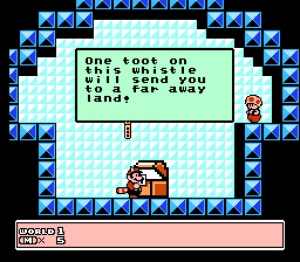
Finally, there are secret things that give you a huge advantage. One example are the warp whistles in Super Mario Bros 3, which allow you to completely skip entire levels. This can be really cool, this is where people who know everything about a game can really shine. But, be careful. There are a few things that can go wrong with high impact secrets like this.

whistle

One problem, is that these secrets can allow expert players to spoil the game for others. Imagine you’ve been struggling through a game only to watch some pro play through using all the secrets and skipping everything you had trouble with. It makes what you’ve been doing seem a bit futile, and some people get tempted to just go to google to figure out the “right”(quickest) way to pass the game. The path where you use all the crazy game breaking secrets usually isn’t the funnest path through the game, it’s *supposed* to be for people who already passed it, right?

Another problem comes from finding a huge secret by accident. If you absolutely must have a big game changing secret, make sure you REALLY hide it. If a player is having fun with your game only to randomly find the item that gives them infinite health, or warps them to the final boss, this can really wreck the game. A recent example of this going wrong is in Super Mario 3D World. In one world, there is a secret in a level that immediately skips you ahead a world. The secret is not very hidden at all, it’s very easy to enter by accident. It can be a frustrating experience to suddenly be shown a brand new world ahead of a ton of stuff you even seen yet. This might be nice for some people, but if it happens without any effort required, it just reminds me of using cheats or game genie. If your game is gonna skip levels, make sure the player really has to go out of their way to make it happen.


Please Be Careful With Secrets

When done correctly secrets can be more than just extras for people who bothered to push on every wall. They can improve the quality and replayability of your game, make exploring levels fun, and give the game a sense of mystery. But, secrets can also mess up the experience if they’re not done correctly. They can introduce repetition and bugs that hurt the game. So if you plan to have secrets in your game, make sure you consider the effect they will have.

Posted in Uncategorized | Tagged | Leave a comment

XNA/Monogame Instant FPS Counter

Making a frame counter is a pain in the ass. It’s almost ALWAYS the same code. So here’s a class to make it easy as humanly possible to add an FPS counter to your Monogame/XNA game.

Usage
To use, just include the CS file in your project and type this at the end of your games Draw call:
[sourcecode language=”csharp”]FPSCounter.Render(GraphicsDevice);
[/sourcecode]

That’s it. You have an FPS counter now. You can also time other things with it, by using the Tick function. For example, if you want to keep track of updates per second, put this in your Update fuction:
[sourcecode language=”csharp”]FPSCounter.Tick(0);
[/sourcecode]
Then you can draw your update counter by calling render with your counter index (0) as a parameter:
[sourcecode language=”csharp”]FPSCounter.Render(GraphicsDevice, 0);
[/sourcecode]

You can have as many different counters as you want this way, you can even position and color them using the extra parameters in the render function.

Download http://www.wonthelp.info/FPSCounter.cs

Posted in Uncategorized | Tagged , | Leave a comment

SharpVGM, A VGM Player in C#

Again and again I’ve wanted the ability to play back VGM files in XNA. VGM is a game music logging format that supports a wide range of hardware, it’s useful if you want authentic retro music/SFX in your game, and if you want to keep file size down. A minute and a half VGM is usually around 50KB, quite a bit smaller than any wave based format.

I was mainly interested in the playback of Megadrive/Genesis music. It seems nobody has ever ported any YM2612/SN76489 emulation code to C#, so I took on the somewhat painful task of porting the C++ version of the 2612 core from gensplusGX. I also ported Shiru’s AS3 SN76489 emulator, allowing playback of songs that utilize the square wave channel.

This player only plays VGMs using YM2612 and SN76489 currently. That means Sega Genesis/Megadrive, Game Gear, Master System, and probably a few others. The player itself is written to work with XNA/Monogame, but the emulator code for the chips should compile and work with any C# based thing, including Unity.

Here’s the player, and its source code.
http://www.wonthelp.info/SharpVGM.zip

You’ll need XNA 4 and .NET 4 redists to run:
http://www.microsoft.com/en-ca/download/details.aspx?id=17718
http://www.microsoft.com/en-ca/download/details.aspx?id=20914

And if you want to compile the player, you’ll need XNA 4 or Monogame. YM2612.cs and SN76489.cs should compile with any C# compiler.
http://www.microsoft.com/en-ca/download/details.aspx?id=23714

And a place to get a ton of VGMs:
http://www.project2612.org/

This also works great with the VGM logging functionality offered by GENNY, a Genesis emulating VST I wrote:
http://gendev.spritesmind.net/forum/viewtopic.php?t=1062

Posted in Uncategorized | 1 Comment

Simple Error Logging With C#

One of the things I’ve learned making games, is that if you’re going to release your game to people you NEED to have some sort of error logging. Otherwise, everyone will tell you that your game crashes and you’ll have no idea why. Sure you tested the game a ton, but there are bugs you probably weren’t able to find. It could be a system specific file path problem, it could be a parsing issue to do with the users region, who knows.

How To Do It
In C# logging errors is pretty damn easy, all you really need is a global exception handler. You can set one up like this:

[sourcecode language=”csharp”]
static void Main()
{
AppDomain.CurrentDomain.UnhandledException += ExceptionTrapper;
main = new DuckGame.Main();
main.Run();
}

static void ExceptionTrapper(object sender, UnhandledExceptionEventArgs e)
{
string error = e.ExceptionObject.ToString();
System.IO.StreamWriter file = new System.IO.StreamWriter("log.txt", true);
file.WriteLine(error + "\n");
file.Close();
}
[/sourcecode]

Now whenever something goes wrong, your game will spit out a log of the error next to it!

Posted in Uncategorized | Tagged | Leave a comment